Project & Work Management software profile
Airtable
A low-code platform for building collaborative databases and workflows.
Airtable combines spreadsheet-like editing with linked records, views, forms and automations. It is useful for teams building lightweight operational systems, content calendars and project trackers, but record, automation and API limits need checking as data grows.
Last editorial review: November 7, 2026. Vendor pricing and features can change; confirm current terms before buying.
Research basis: desk research using public product and pricing information. This profile is not a claim of hands-on testing.
Inside the product
A look at the interface.
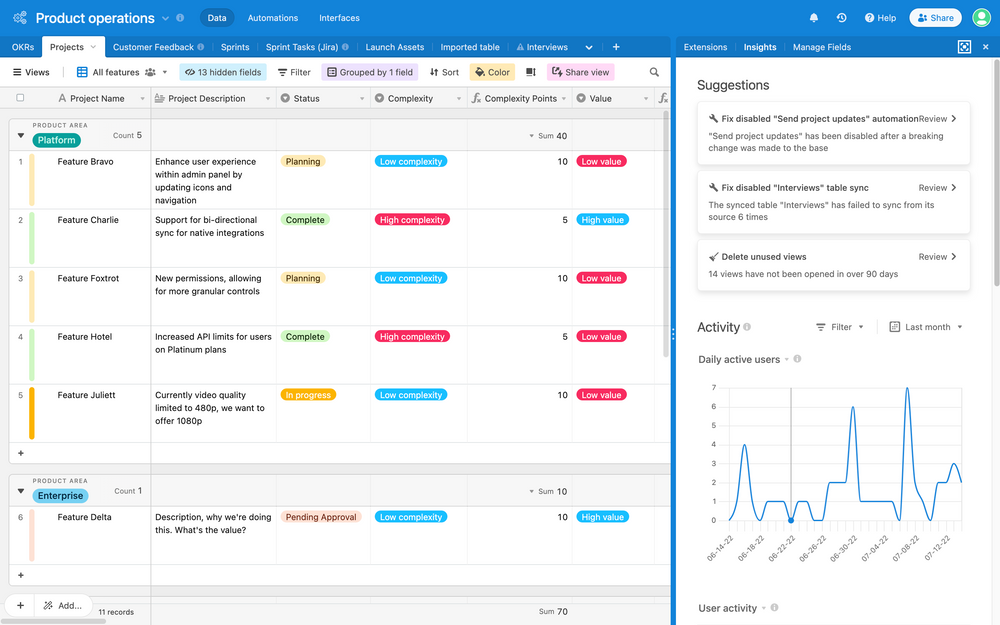
Product imagery is credited to the linked source. Screenshots may be older or vary by plan and region. StackPick is an independent guide, not the software provider.
At a glance
Who should consider Airtable?
- Operations teams building internal trackers
- Content teams managing editorial calendars
- Small businesses organising records without building a custom database app
Key capabilities
Where it can work well
- + More structured than a traditional spreadsheet
- + Flexible views for different teams
- + Can prototype internal tools quickly
Trade-offs to check
- – Record and automation limits vary by plan
- – Per-editor pricing can become significant
- – Complex relational needs may be better served by a dedicated database
Pricing & free plan
Check the limits, not just the headline price.
Airtable Free is $0. Team is US$20 per billable collaborator/month annually (US$24 monthly); Business is US$45 annually (US$54 monthly); Enterprise Scale is custom. Read-only collaborators and form submissions are not billed as editors.
Free-plan check
Yes. Free is available at no charge. It is intended for individuals and very small teams; it limits paid-permission collaborators to 5 editors/creators and 50 commenters, with other record, attachment and automation quotas.
More Project & Work Management software
Explore other tools in this category and compare their plan limits, workflows and trade-offs.
Community experience
Reviews from users.
Only reviews approved by StackPick moderators appear here. A submitted review is not published immediately.
Share your experience
Sign in or create an account to submit a review. Email confirmation may be required before you can sign in.
Sign in to review